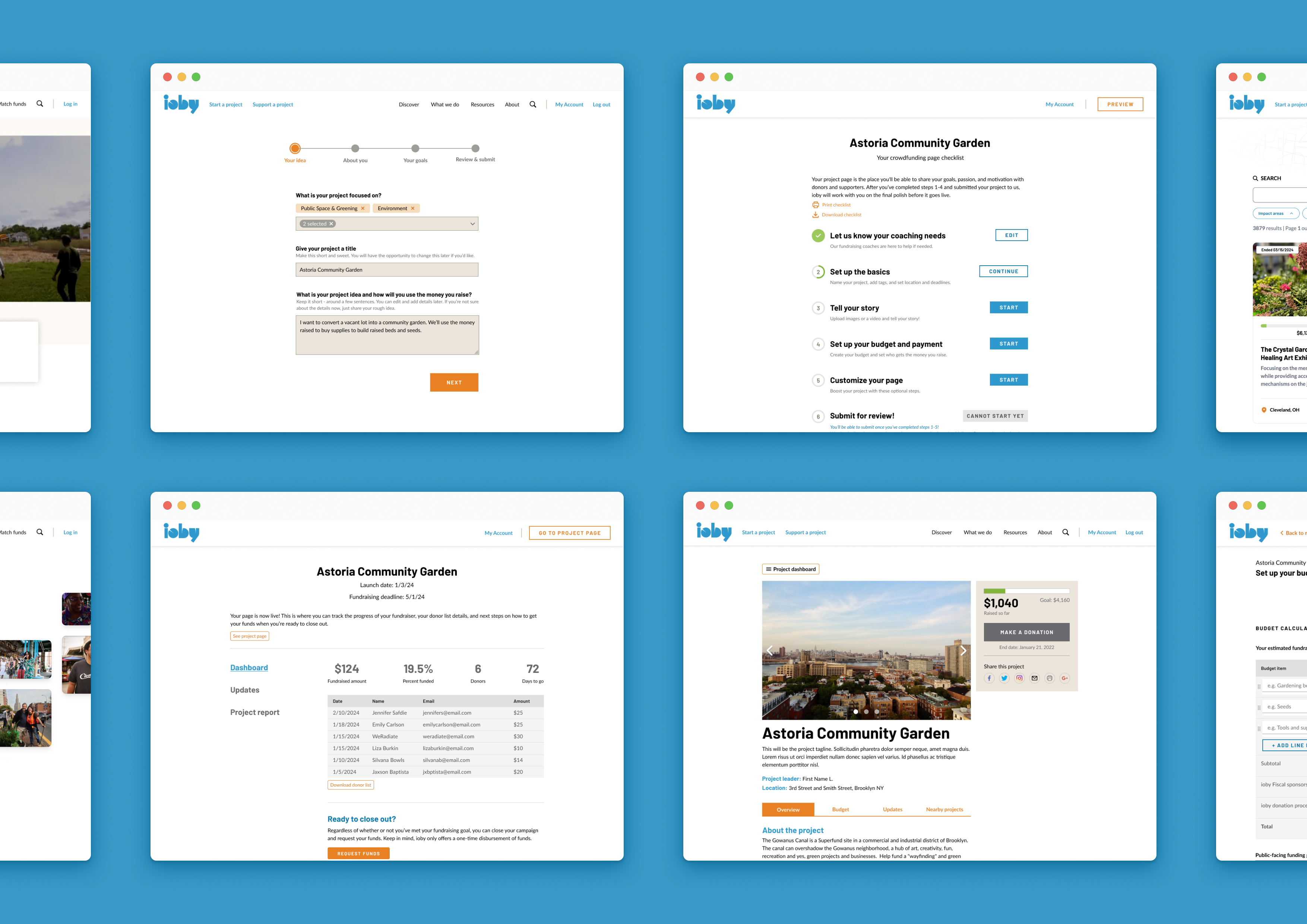
Overview
As the product owner and sole designer, I…
- Shadowed 14 staff across every team and mapped how work really got done
- Wrote the product definition and the phased plan that leadership approved
- Ran co-design workshops with Customer Success, Finance, Match and Partnerships teams
- Kept the project moving after our CTO left, and helped hire his replacement
- Designed the Retool workspace, including the safeguards on every money-moving step
problem
Fifteen years of workarounds
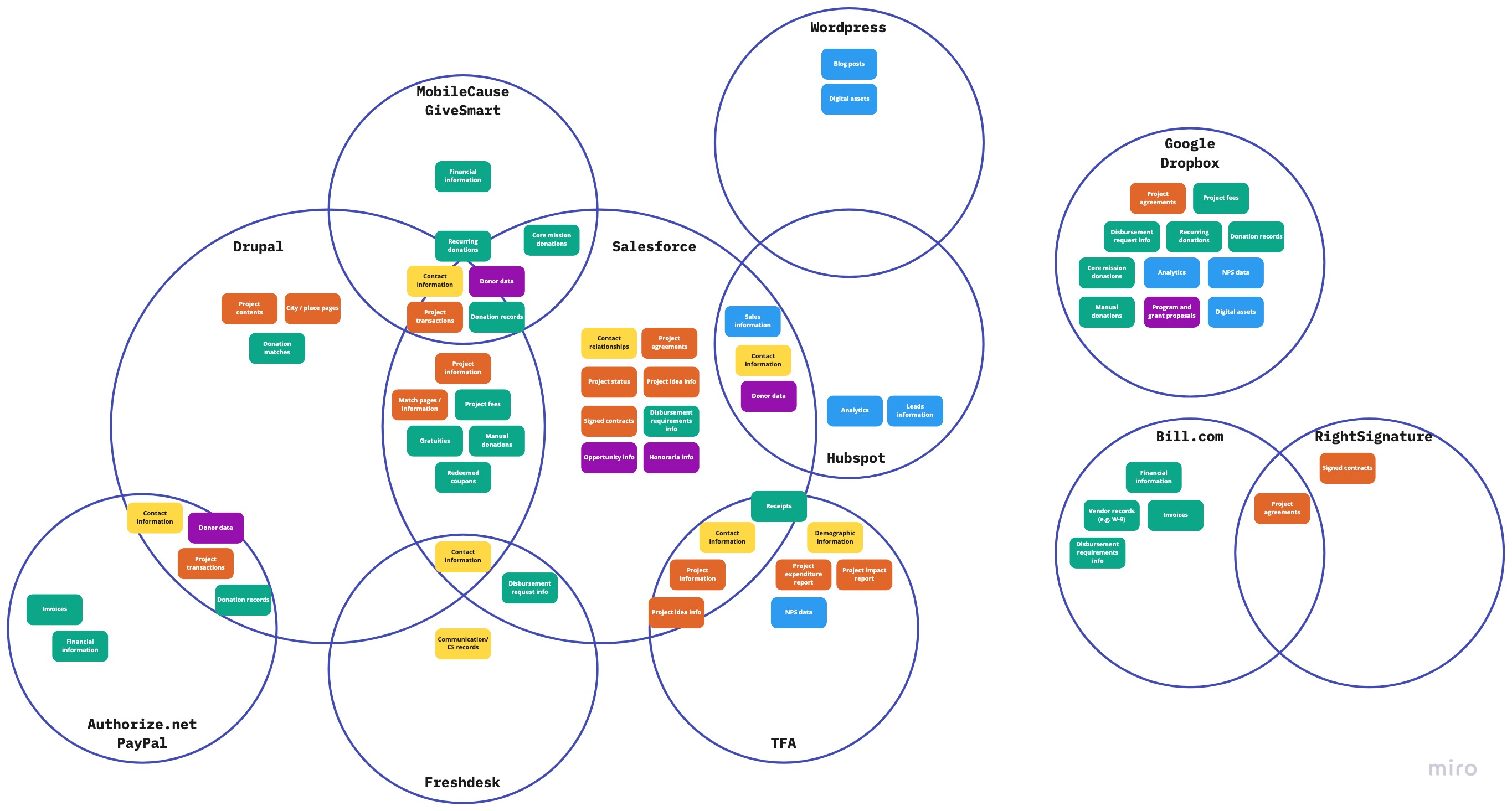
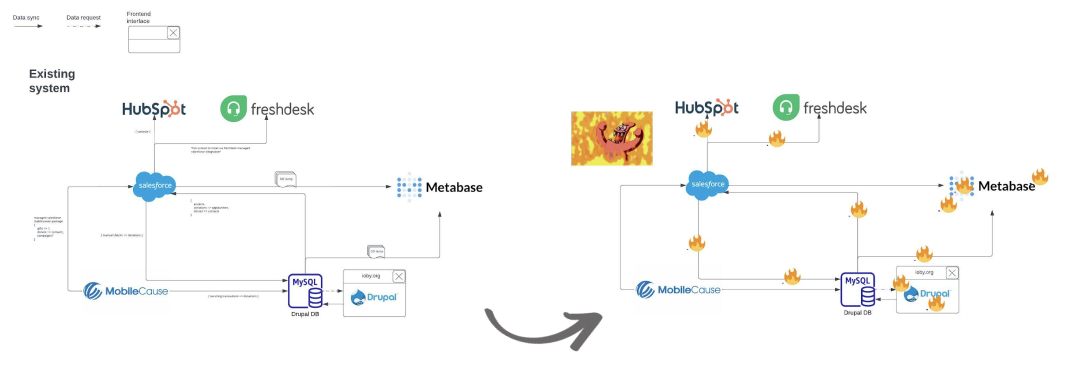
ioby's platform was a patchwork of more than ten third-party tools, from Drupal and WordPress to Salesforce, HubSpot, Freshdesk and The Form Assembly. Some tools were showing their age and integrations took constant upkeep. When Drupal 7, the system ioby.org ran on, was scheduled to sunset, ioby had to rethink its technology and move to a modern stack. Staff spent more time keeping the tools in sync than helping community leaders.
Payouts were the slowest and riskiest job
Paying a leader their money took 1.5–2 hours of staff time spread across six or seven sittings, a 20-item checklist ticked manually in Salesforce, and the same project details typed into tool after tool to force syncs. Finance alone worked across seven: Drupal, Salesforce, Freshdesk, Google Sheets, Metabase, Bill.com, and RightSignature. Because no one owned the whole process, Finance ended up answering leaders' emails on top of regular accounting and bookkeeping work.
Research and insights
Understanding staff's painpoints
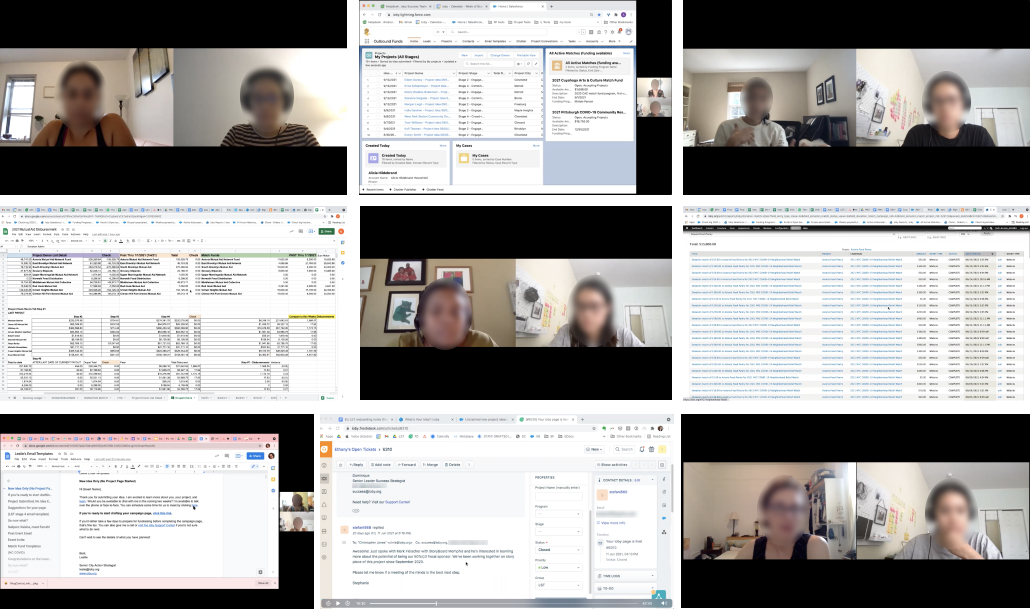
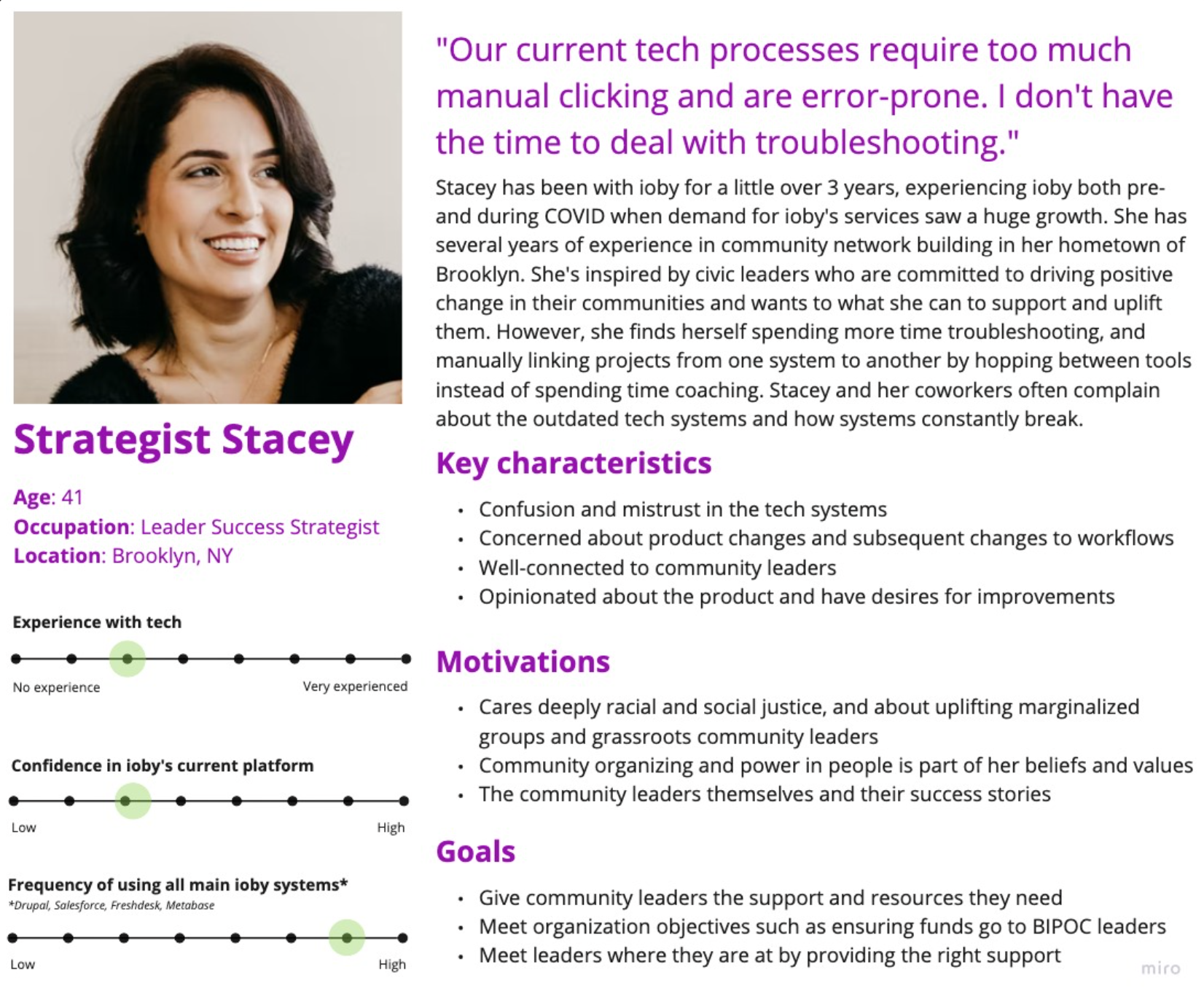
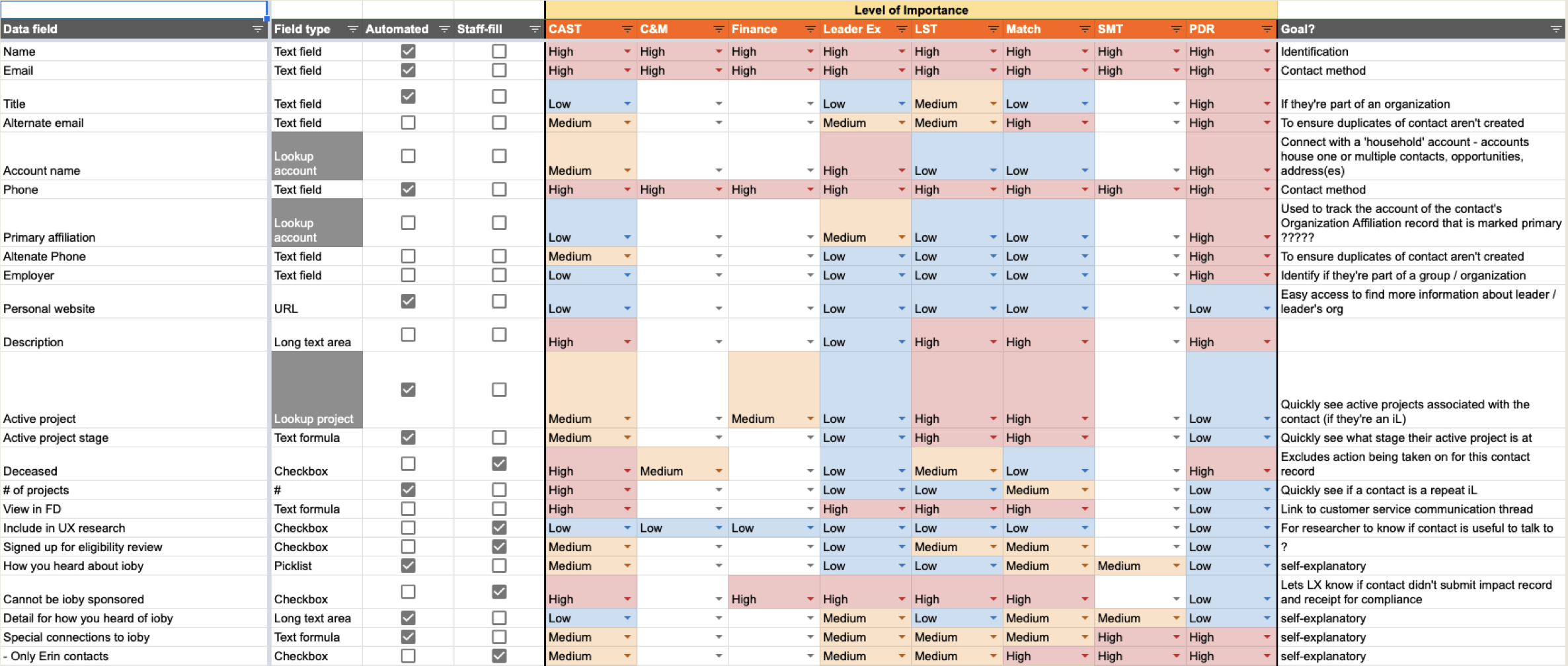
I shadowed staff on every team as they did their real work, recorded the walkthroughs, and had team leads rank which Salesforce fields they actually used. I distilled the strategist role into a persona, Strategist Stacey. She's the person in every system all day, but with little confidence in any of them.
No one trusted the numbers
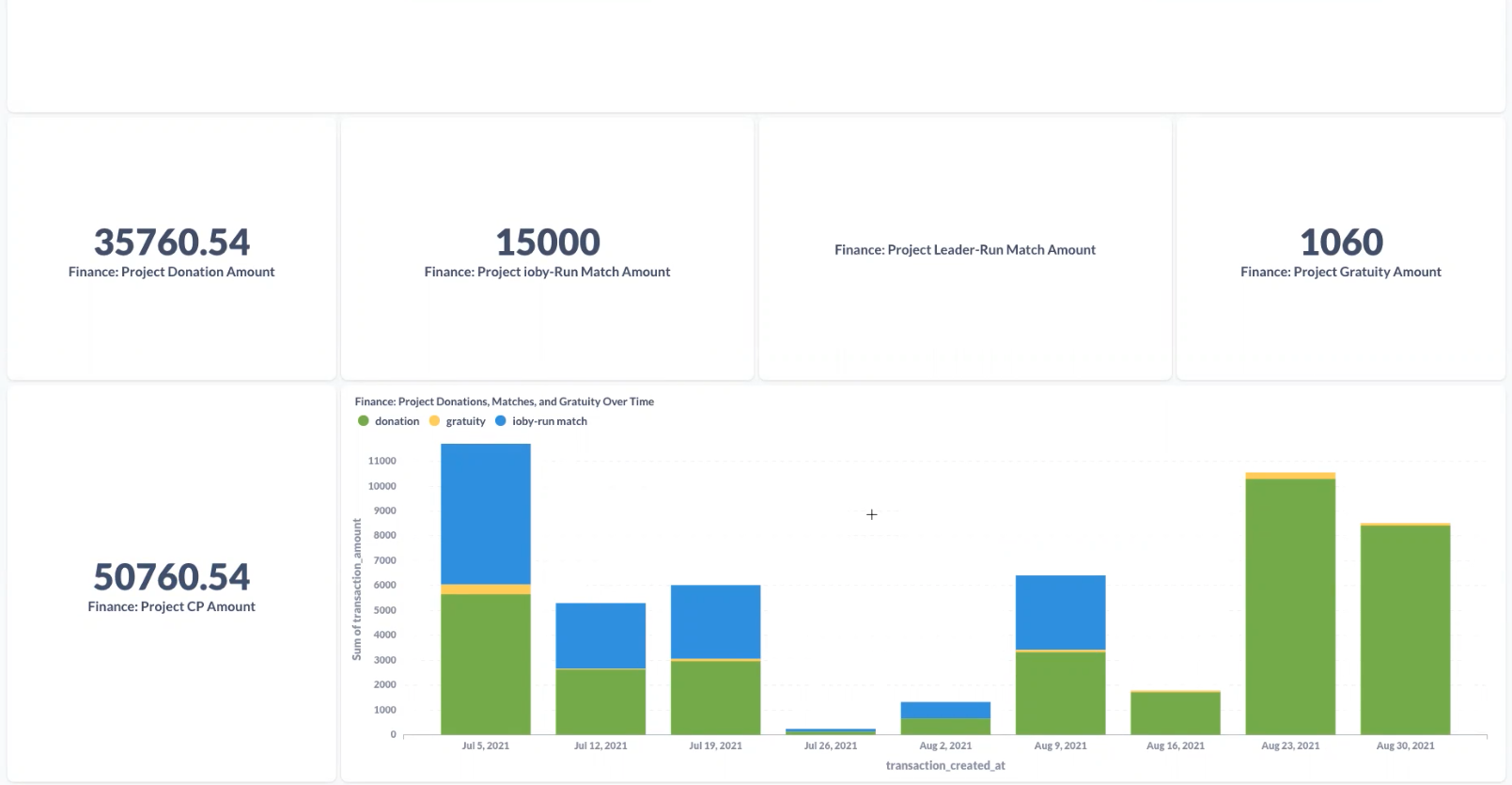
The same figures lived in Drupal, Salesforce and Metabase, and they didn't always match. Finance checked every payout in three places before sending money.
“Not all numbers in Drupal can be counted on, nor Salesforce for that matter.”
Staff wanted to know which user needed them
Strategists coached dozens of leaders at once, but the tools sorted projects by when the idea came in, not by who had gone quiet or who needed the most attention.
“For all stages, some indication of when the leader last responded or interacted with us would be very helpful.”
Leaders got stuck between steps, and staff couldn't see where
Handoffs happened over email, so a project could stall for weeks with no one noticing.
“We don't have visibility of where people are getting stuck in Stage 5. Did they send the budget? Did they send the agreement? We have to look up the email thread to find out”
Payouts were slow and tedious to do
Finance had ended up running both the paperwork and the conversation with leaders and project leaders felt the delay.
“People were just not happy with how slow the disbursement process was going.”
Process
Co-designing with the people who'd use it
ioby had been burned by outside agencies that handed staff new tech without asking for their opinion or a proper onboarding. So, I ran working sessions with Customer Success, Finance, Match and Partnerships, walking teams through designs, collecting feedback in shared docs, and turning it into Asana tasks. I also set up two-week sprints and opened every sprint kickoff to all staff. ioby was small, and for a project that affected the whole organization and its workflows, this was an all- hands-on-deck kind of project. I wanted every team, from fundraising to Customer Success to Finance, to have a voice.
How the project list evolved
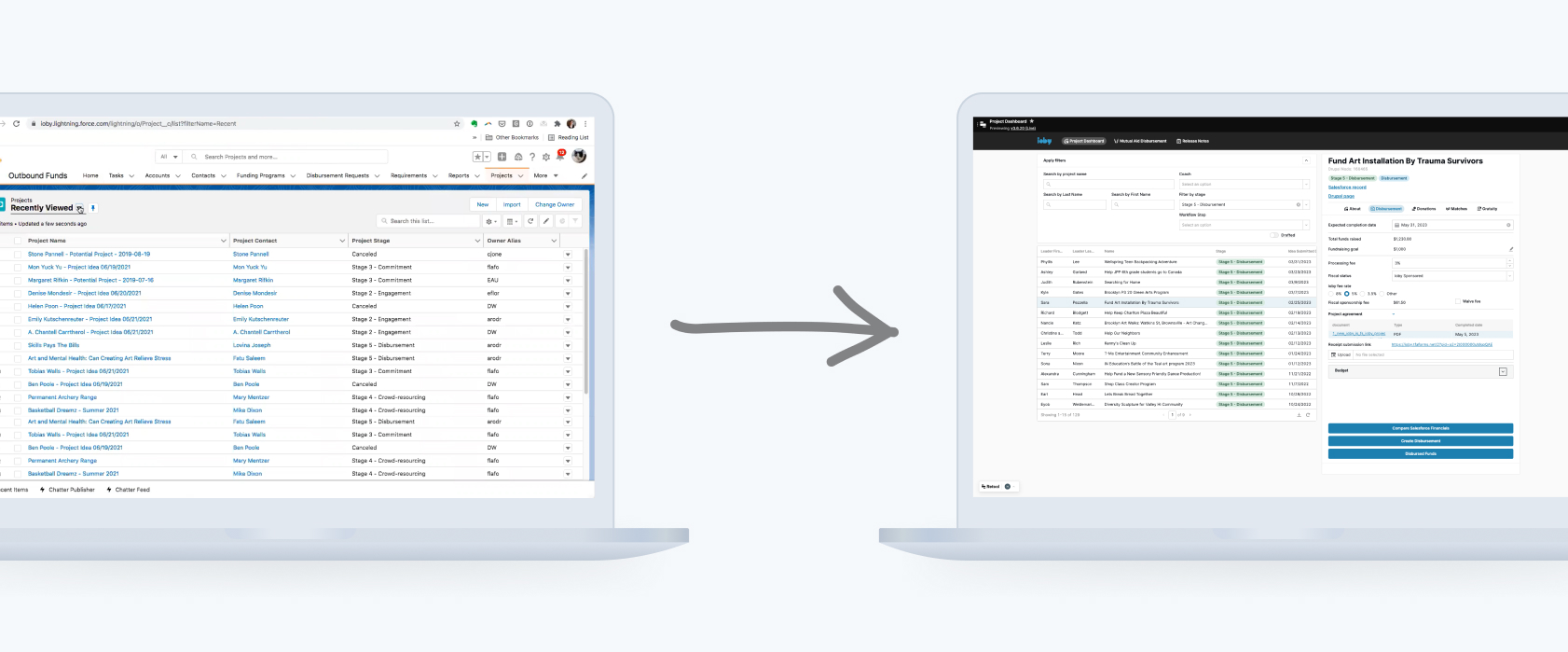
The strategists' project list shows how this worked. It went through several rounds in a three year period: a custom build I designed from scratch, a new layout shaped by design sessions with staff, and finally the version we built in Retool.
V1 · Custom build
A new tool that felt like the old one
We first planned to build the internal tool from scratch in Ruby on Rails. My first versions gave strategists a list for each stage of the pipeline, checkboxes to claim new ideas in bulk, and a full page for every project, with tabs for its information, financials, team, donations and files.
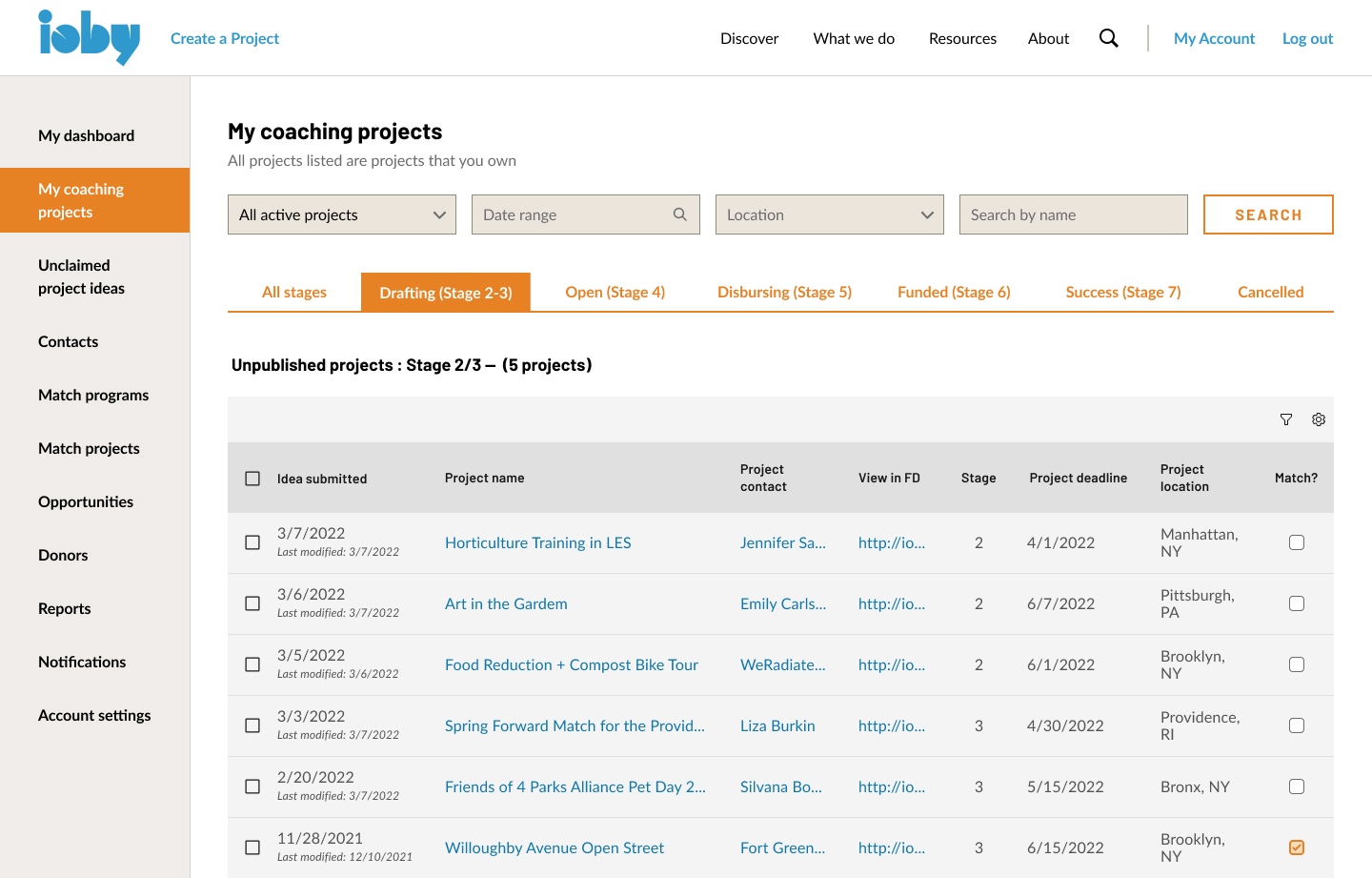
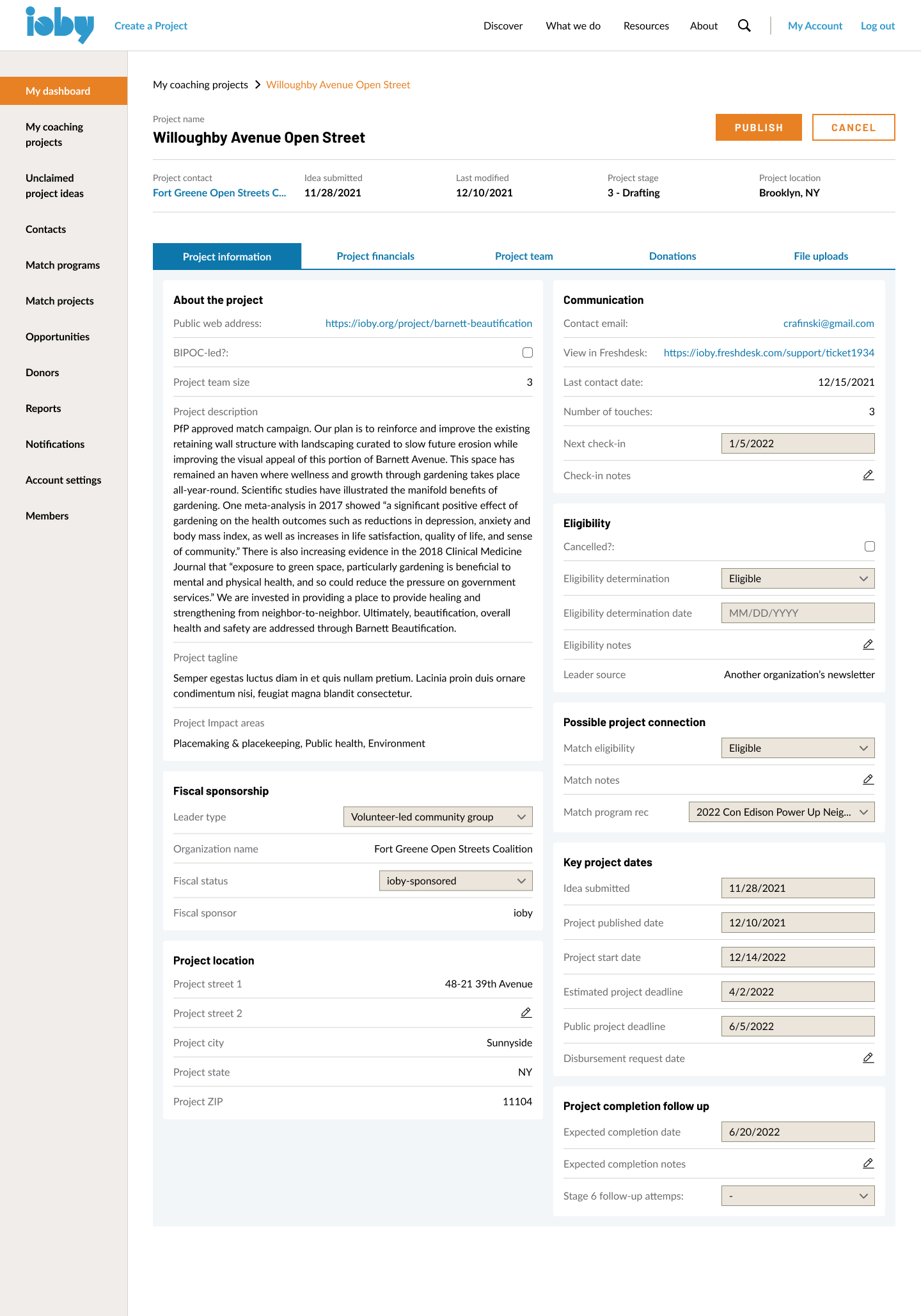
When I walked strategists through these designs in early 2022, their feedback was that it felt too close to Salesforce. Checkboxes weren't all that helpful, and strategists still had to open each project's page, a few clicks deep, before they could act on it.
V2 · Sketch to high-fi
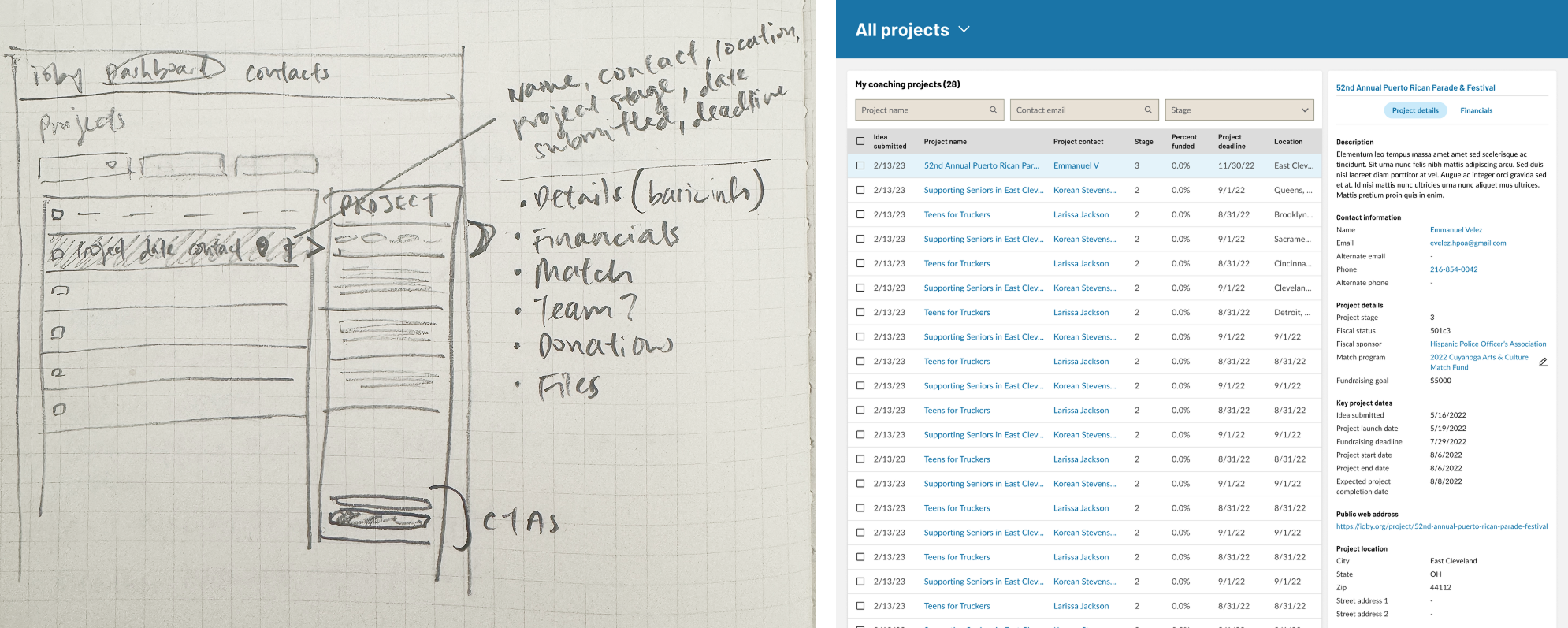
The list and the project side by side
After more design sessions, and with our new CTO on board in 2023, I sketched a layout that kept the list on the left and the selected project's details and actions on the right, so strategists could review and act on a project without leaving the list. I ordered the details by the fields team leads had ranked as important.
V3 · Built in Retool
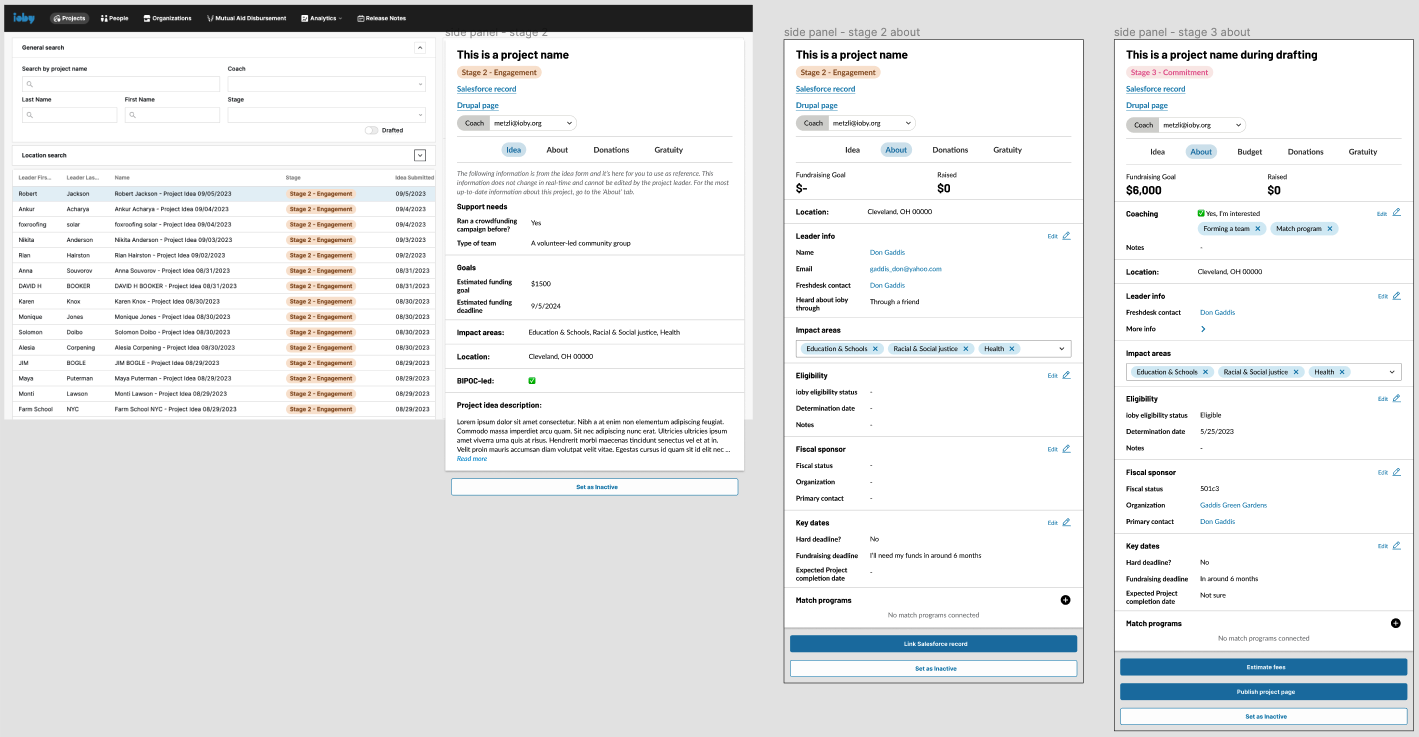
From custom build to Retool
With the onboarding of a new CTO came the proposal to use Retool, a low-code tool for internal apps. We made the call together: with Drupal reaching end of life, Retool could move staff off Salesforce far sooner than a custom build. The visual hierarchy of my previous design versions carried straight over.
Deep dive: payouts
One decision first: who talks to the leader?
My first design of the payout workflow originally put Finance at the center with a task list for every fund disbursement request, and Finance handling the leader's questions about payouts. But when the Finance team changed shortly after, the Customer Success lead and the Director of Finance agreed Finance didn't have the capacity to run both the books and the external communication. Leaders also lost continuity: they were working with one Customer Success strategist for months, then got handed to a stranger at the finish line.
Customer Success
Handle the communication when leaders ask to cash out. Keep the relationship with Customer Success to confirm the final funds, fees, budget and fiscal sponsor.
Finance
Step in only once details were confirmed and admin work needed to be done, like getting the project agreement signed, the Bill.com setup, and authorizing the payout.

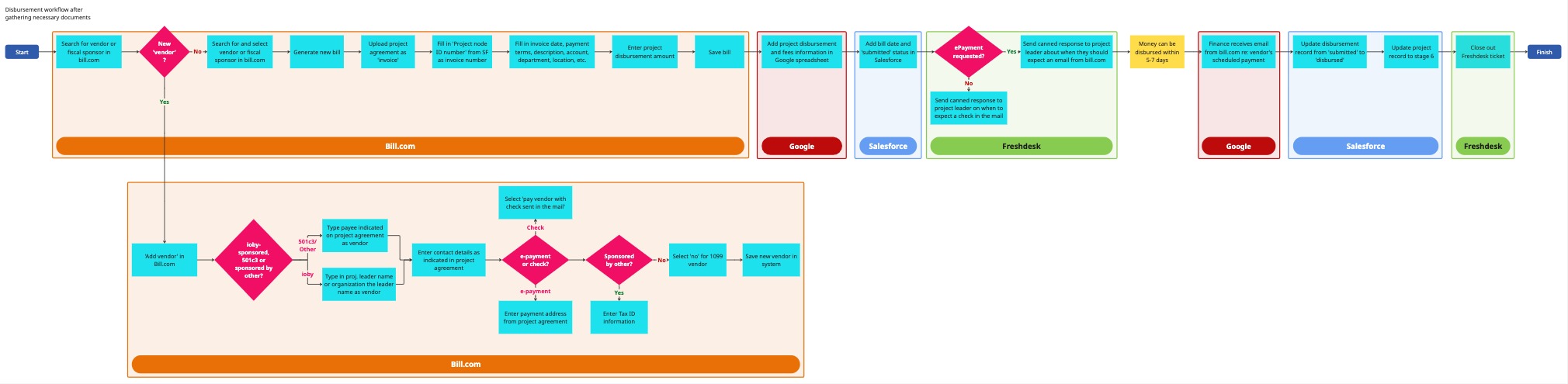
Not every tool could go. I wanted a leaner tech stack, and Bill.com was far from user-friendly. A painpoint that was brought up was that leaders got unbranded emails asking them to sign up for a bill.com account, and quite a few users assumed these emails were spam without realizing they must have a bill.com account for ioby to disburse their funds. But Bill.com held the approval trail auditors check, so we couldn't drop it quickly. I prioritized getting staff off Salesforce over replacing Bill.com, and let Retool handle everything around it.
Key design decisions
01Starting a payout
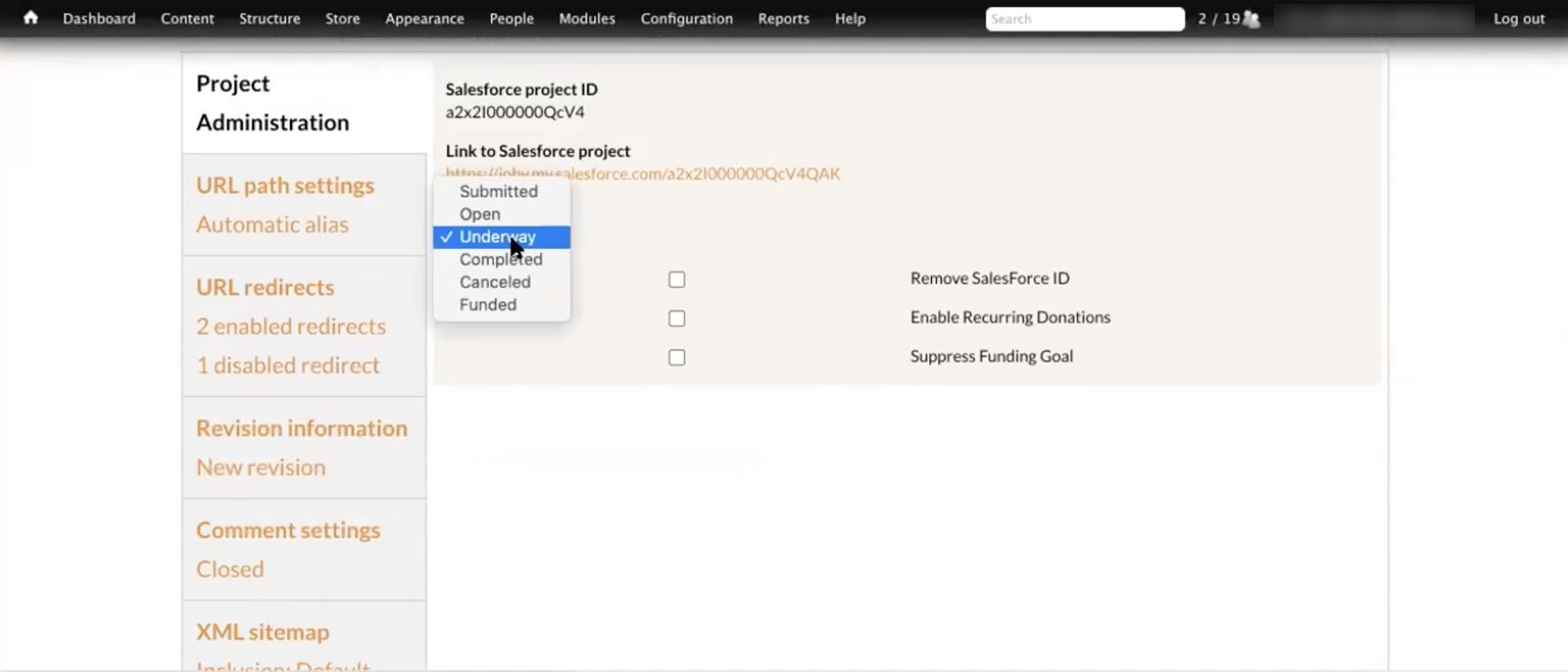
Originally, when a user emailed ioby to end their fundraising, Customer Success had to change the project's status in Drupal, Salesforce, and Freshdes, then Slack a Finance team member and start an email thread in Freshdesk to handoff to a Finance team member
Before
Change the status by hand in Drupal, Salesforce and Freshdesk
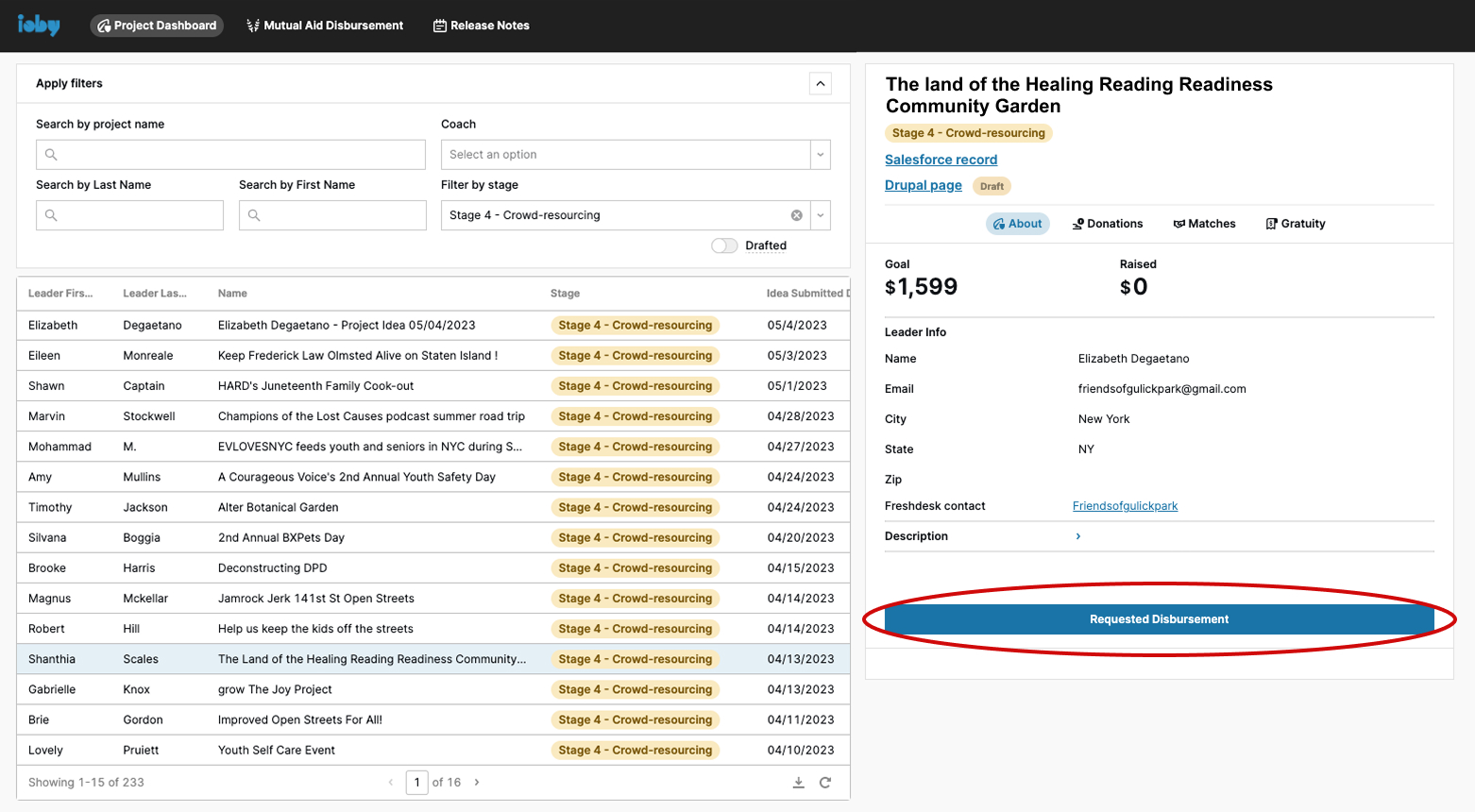
After, in Retool
One button updates every system
02Communicating with the project leader
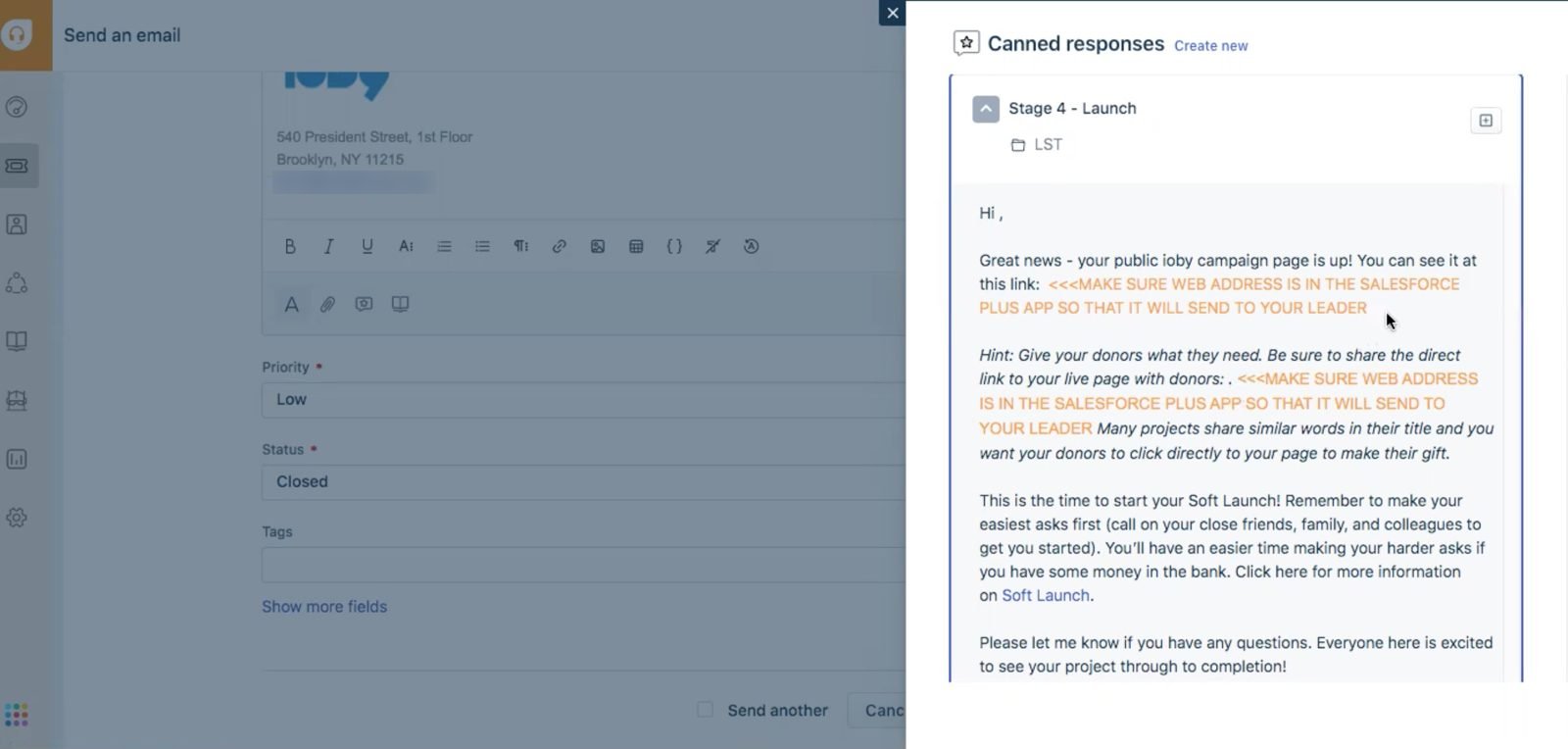
The original workflow required staff to go to Freshdesk and find a templated response that depended on whether:
1) The project was sponsored by ioby, another org or 501c3,
2) The project met their fundraising goal or not, and
3) The project needed to change the estimated project completion date
because the Finance team needed to have the right tax documentation, accurate dollar amounts for bookkeeping, and date for when staff needed to follow up with the customer to ensure the funds raised on ioby were used as intended, respectively.
Before
Find the right template among 8 combinations of sponsor, goal and timing
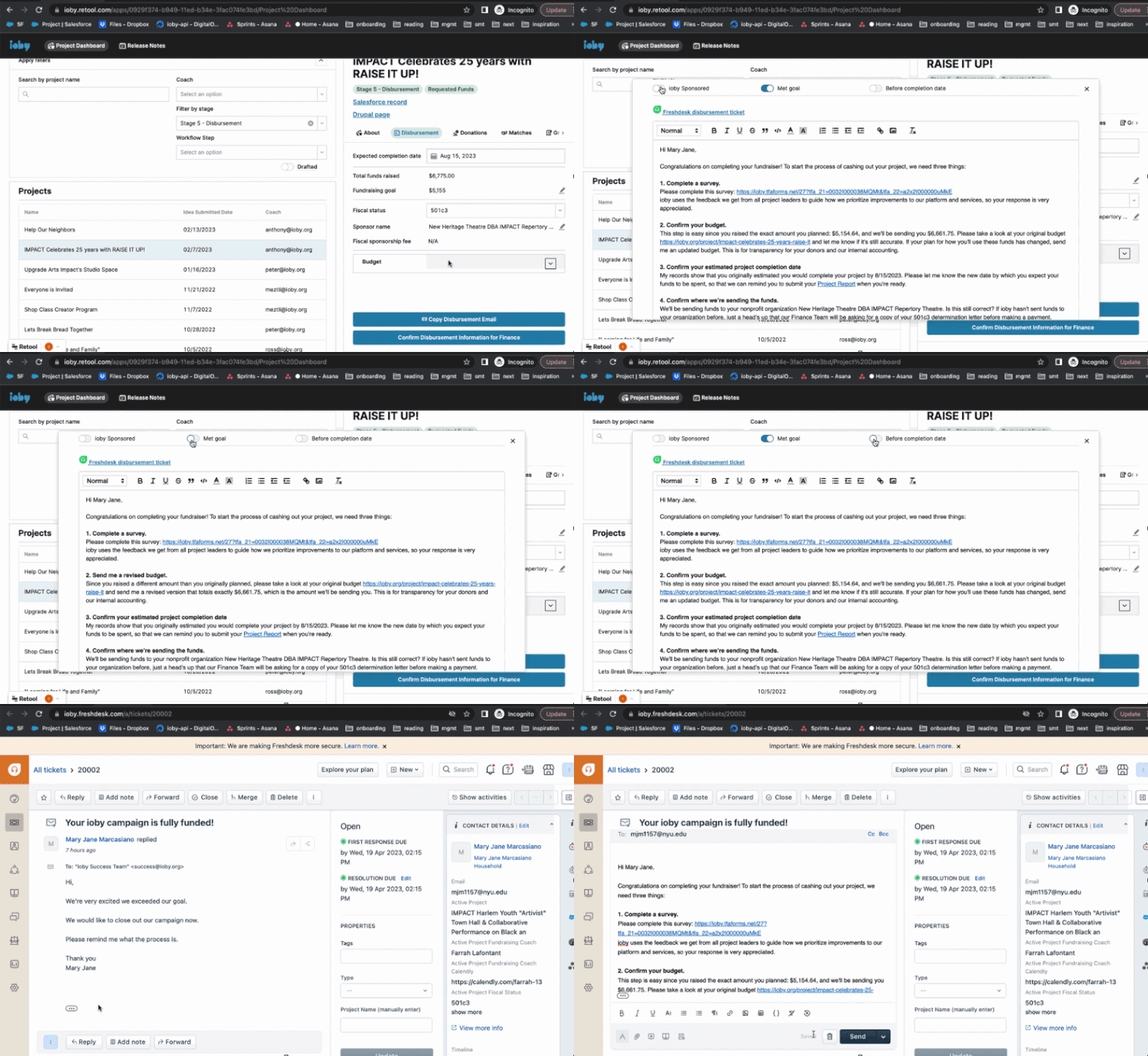
After, in Retool
Three toggles build the right email, with a link straight to the Freshdesk thread
03Calculate fees
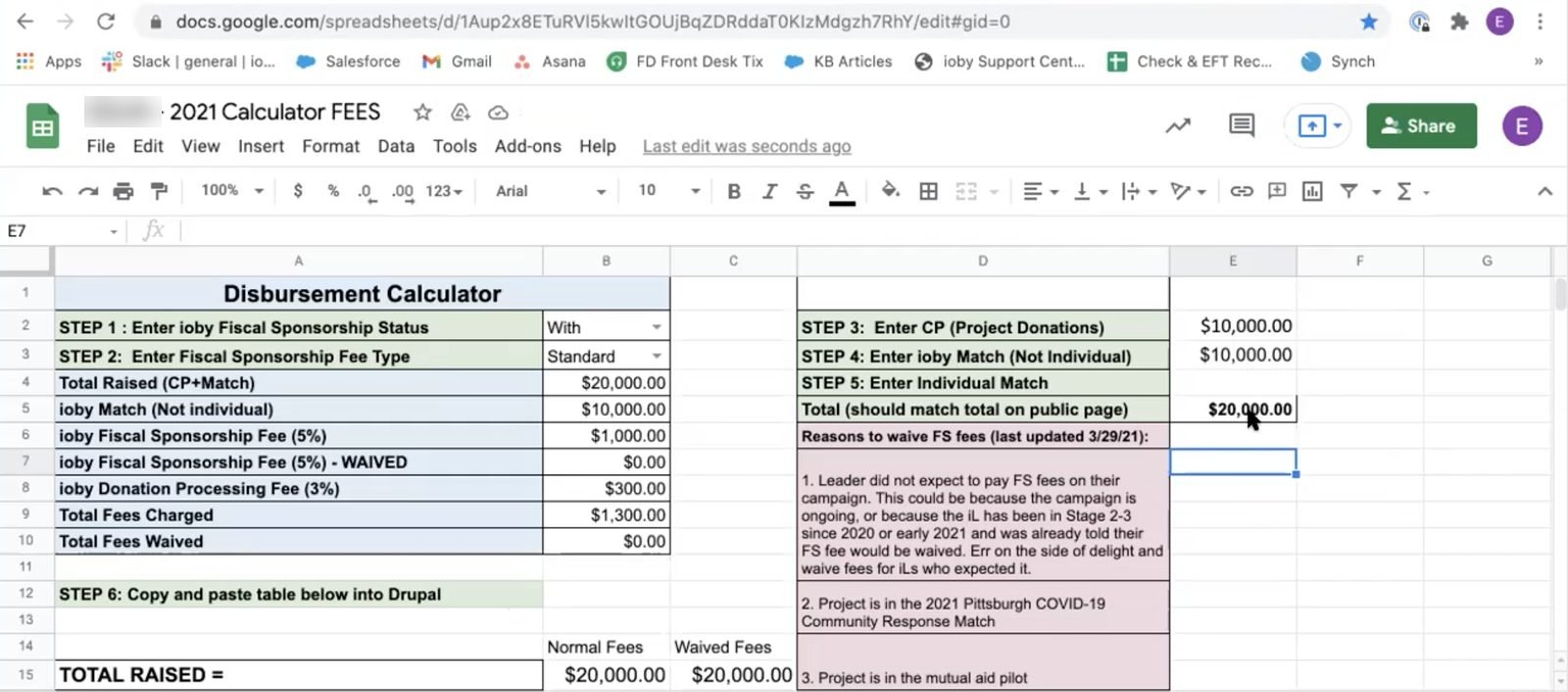
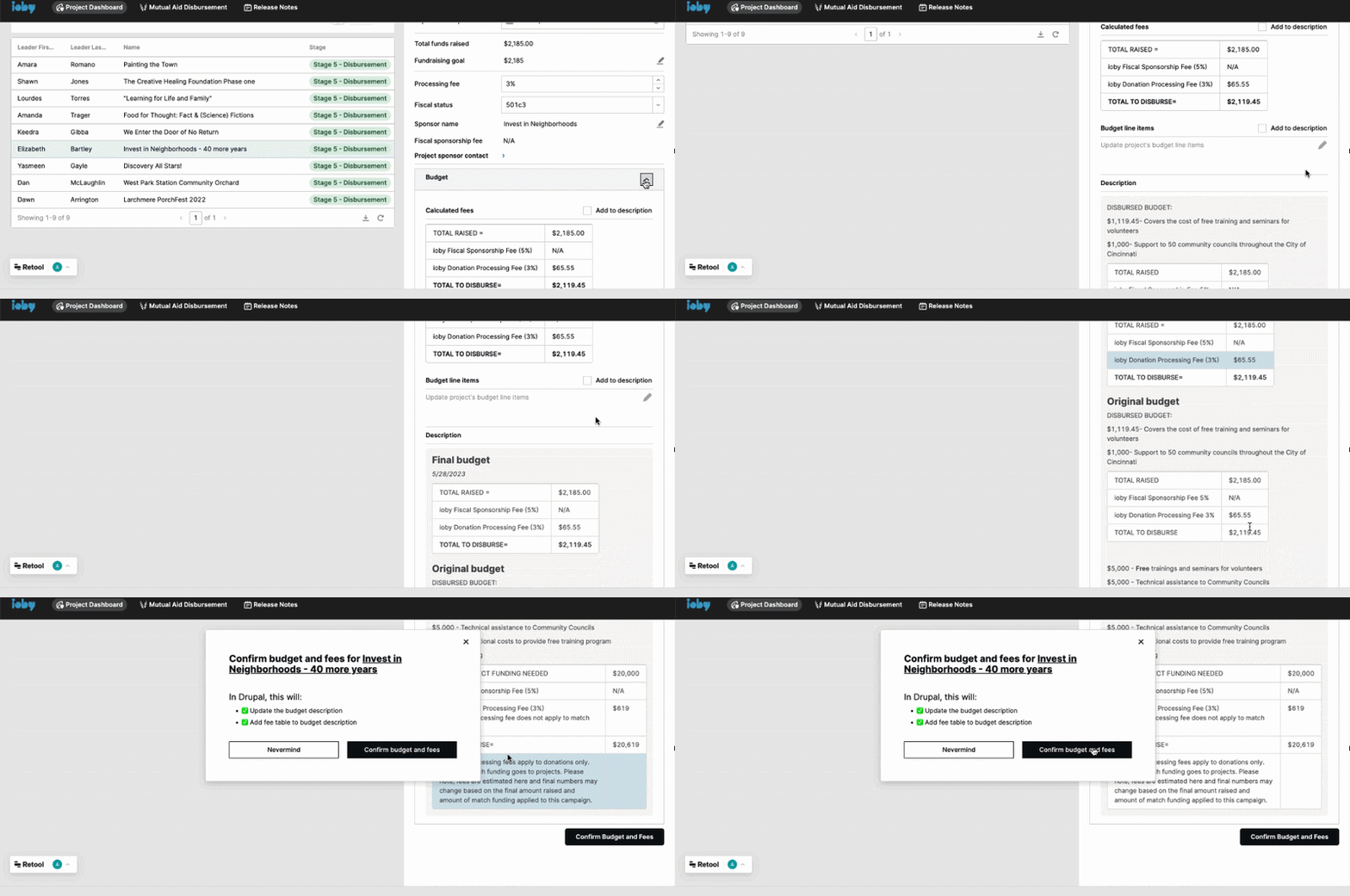
Once all the necessary information was confirmed, Customer Success had to finalize the fees chart and post it to the public project page for full financial transparency.
Before
Fee calculator in Google Sheets, then paste a table into Drupal
After, in Retool
Pick the fee rate; the table calculates itself and publishes with one click
04Hand off to Finance
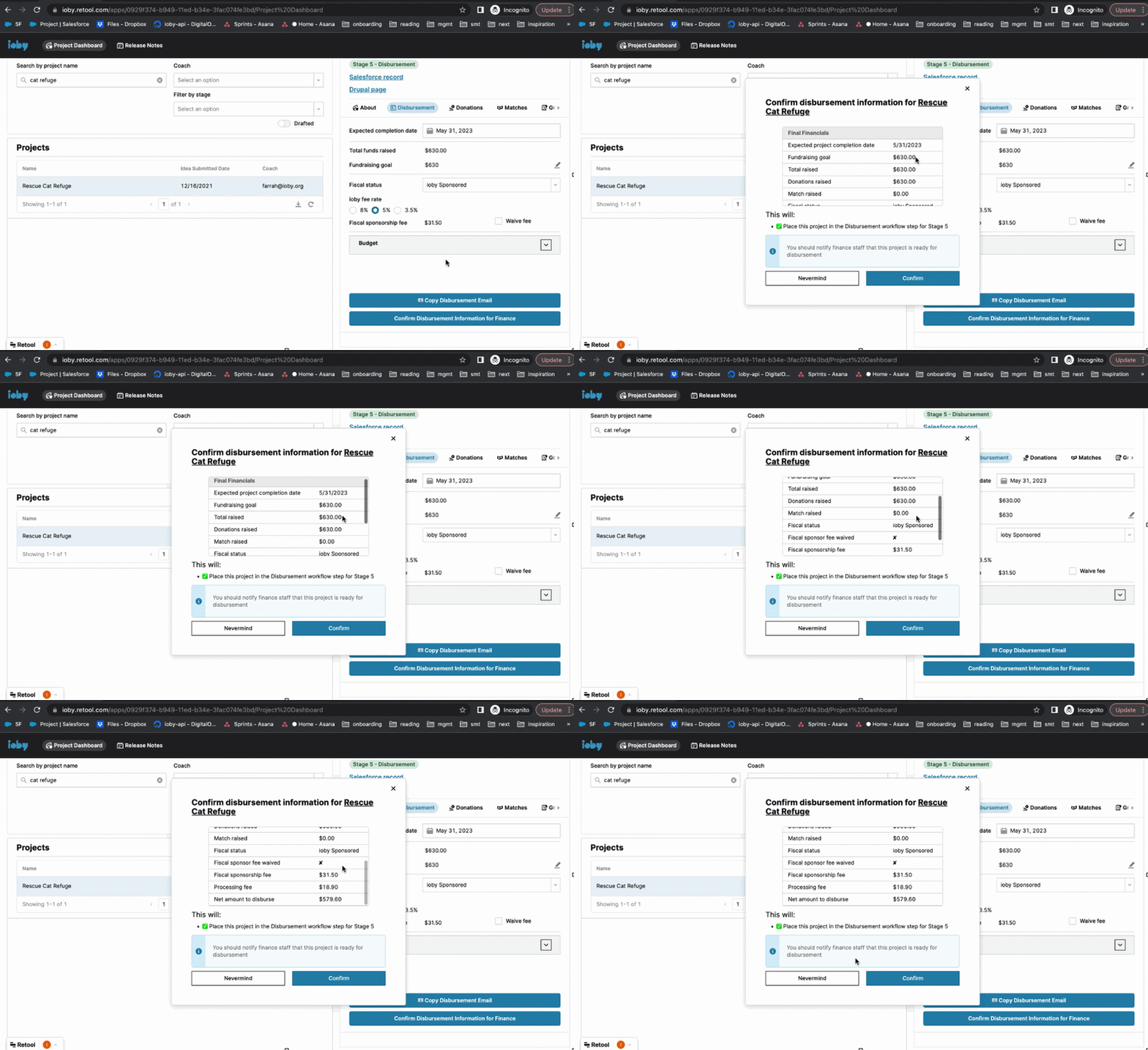
Friction on purpose: the button to hand off to Finance stayed locked until fees, budget and fiscal sponsor were confirmed. Most of my work removed manual steps, but this extra measure helped build trust among staff, especially staff who had a lot of distrust with the organization’s data. It showed that everyone was going through intentional checkpoints to ensure accuracy.
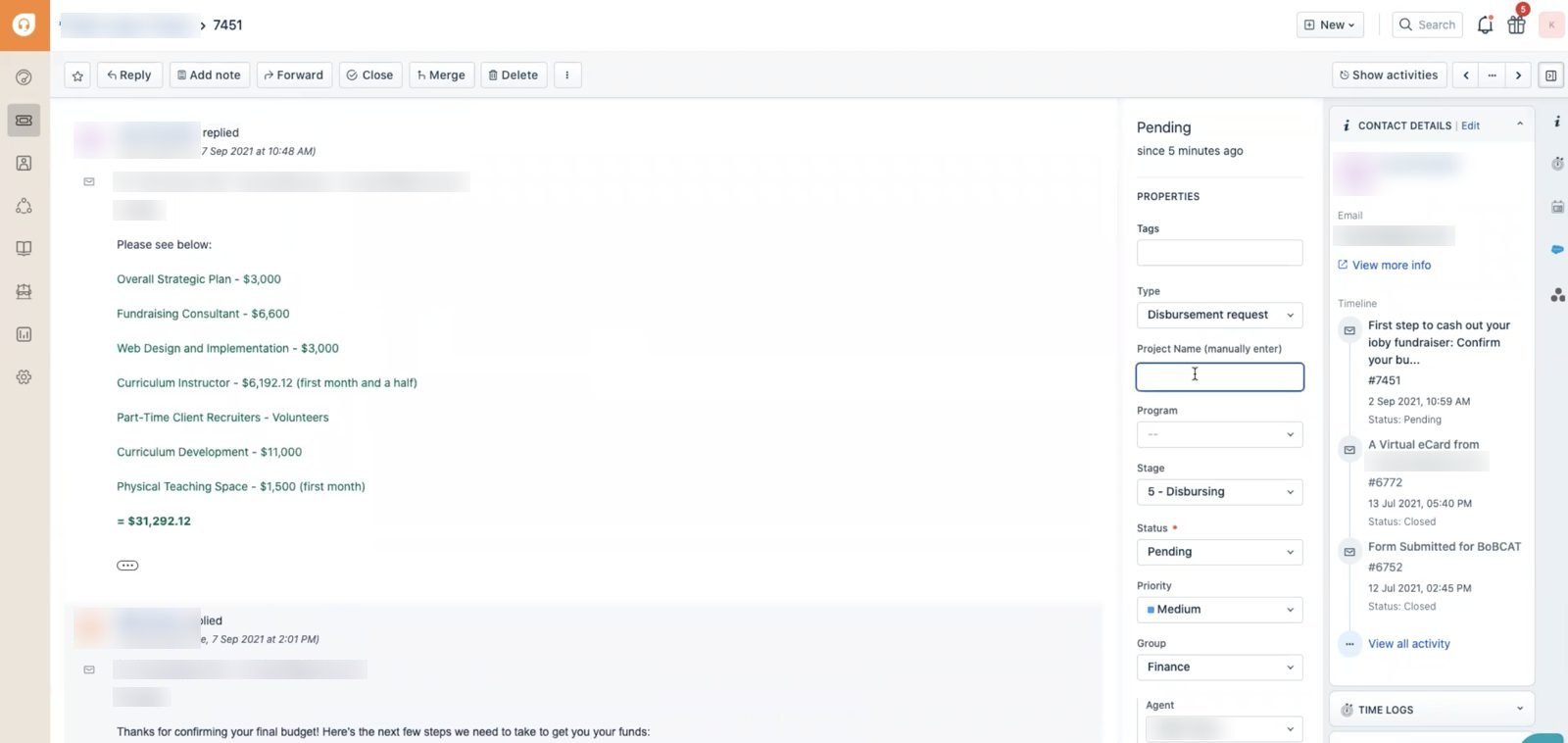
Before
Forward the thread, message Finance, re-type the project name
After, in Retool
"Confirm for Finance" button plus an automatic ticket handoff
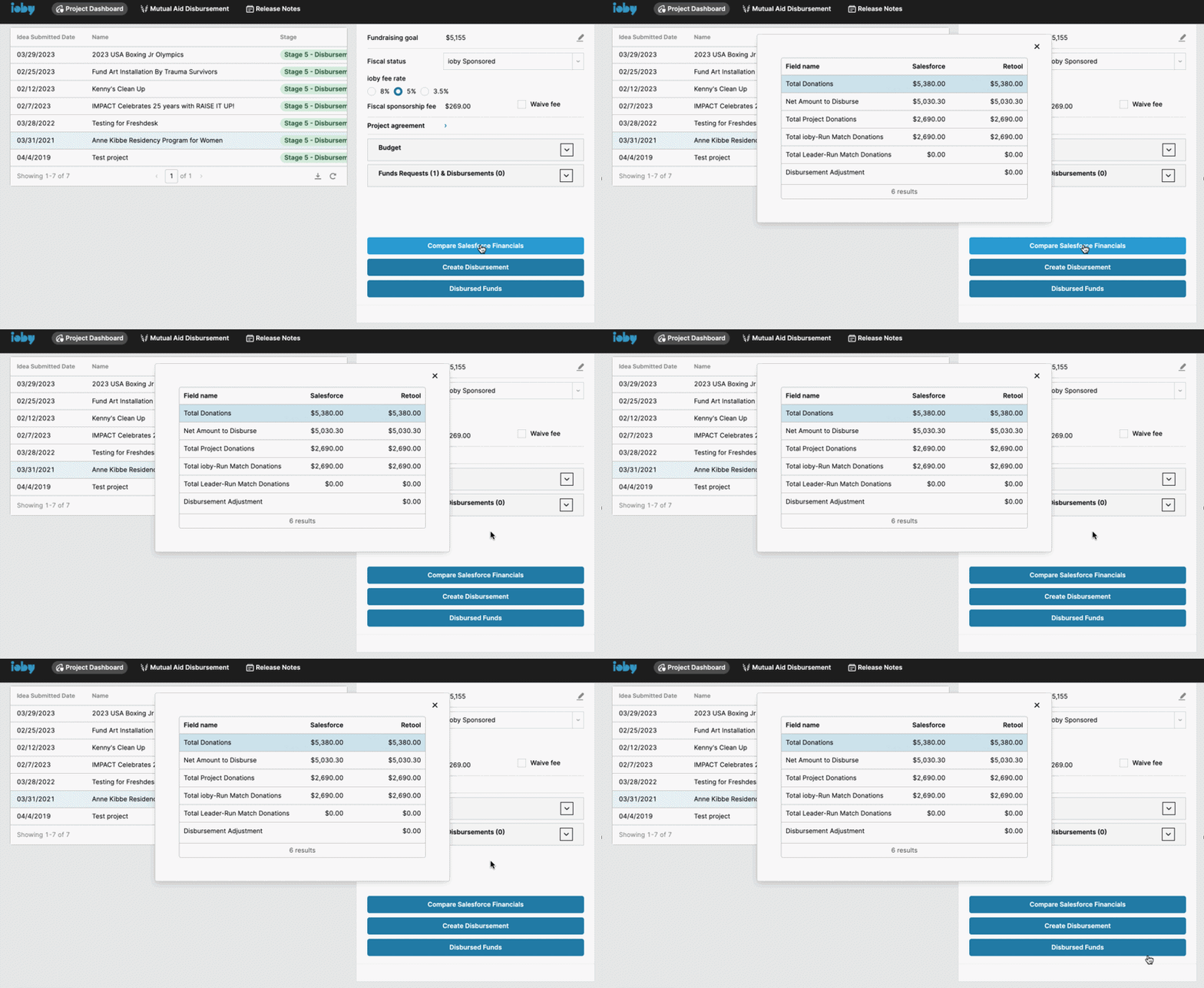
05Check the numbers
Before
Cross-check Drupal, Salesforce and Metabase by hand
After, in Retool
One "Compare Salesforce financials" button For Finance to do a final check
Impact
ioby's biggest workflow change since 2012
Retool became the daily workspace for every Customer Success and Finance staff member by May 2024. It was adopted with little formal training needed because the people using it had shaped its design.
of Customer Success and Finance staff adopted Retool by May 2024
less staff time per payout, from about 1.5–2 hours to about 1 hour
tools in the payout path: Retool, Freshdesk, RightSignature and Bill.com
Across around 250–300 payouts a year, that's an estimated 125–300 staff hours back. The same workspace also ran the strategist workflow from the moment an idea came in, a match-fund dashboard for the match programs director, and every account and donor record migrated out of Salesforce.
“You've led a really important part of a cultural change at ioby to ensure that the program staff can trust the product team, understand the product team, and believe that the product team is going to deliver on what they say they will.”
ioby closed in September 2024, after 16 years.
Reflection
Navigating change and ambiguity
Losing our CTO mid-build
In mid-2022, halfway into the first phase of the redesign, our CTO left, not long after our senior engineer. The plan had assumed a stable in-house team.
What I did
- Laid out options for our CEO: hire a senior developer, bring in an agency, or partner with a university program, and whether to pause internal tools
- Rewrote the job descriptions and set up a hiring panel
- Re-scoped the roadmap and kept staff informed with regular demos
- Wrote the onboarding documentation for our new CTO, who joined beginning of 2023
Saying no to good ideas
Staff were excited and requests for new features kept coming, things like list-view extras and match program management.
What I did
- Walked each team through the roadmap and logged every request in the backlog
- Separated must-haves (staff off Salesforce, data they could trust) from nice-to-haves, and protected the migration
- Gave every request a home in an Asana ticket, so no one felt that their request was ignored
Designing inside someone else's components
Retool came with its own component library and we didn't have time to fight it.
What I did
- Kept the information hierarchy from my research and let the visual style go
- Spent my design effort on flow, defaults and safeguards, where staff would feel it most
Key learnings
- The importance of buying trust. For a staff that's been burned by product work, this project was a cultural change for the organization. The importance of building trust was evidenced through the design alone. Many confirmation dialogs were implemented throughout and that intentional friction was not only necessary but welcomed, especially for an organization where fluctuating cash flow was part and parcel of the business.
- Treat a plan as a set of options. A lot of change and restructuring happened in my three years at ioby, and it was important to have plans in place when one breaks, because change and uncertainty is inevitable in the product development cycle.